The Right Documentation for Your Version
What’s New?
Section titled “What’s New?”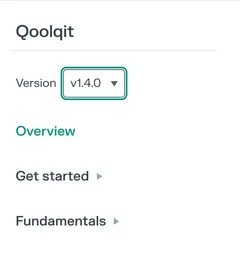
The Pasqal Documentation Portal is introducing documentation versioning, making it easier to find the guides, tutorials, and reference information that match the version of the library you use.
A version selector at the top of each supported documentation sidebar lets you switch between available releases, all within docs.pasqal.com, with the same familiar design and navigation.
Working with an earlier release? You can explore its documentation without leaving the portal. Looking for the newest features? The latest documentation remains the default entry point.
How To Use It?
Section titled “How To Use It?”- Open your library’s documentation on docs.pasqal.com.
- Choose an available release from the version selector at the top of the sidebar. The portal keeps you on the same page when it exists in that version; otherwise, it takes you to that version’s home page.
- Browse and search in context. The sidebar follows your selected version, and “Current section” search shows results from that version. “All sections” searches the version you are reading alongside the latest documentation from other sections, not the latest version of your current section.
Explore It!
Section titled “Explore It!”Visit the Pasqal Documentation Portal and choose the documentation version that fits your project.
Your tools, your version, the right documentation all in one place.